
How to Prepare for a Video Interview in 2026: The Camera-Ready System That Calms Nerves and Wins the Next Round

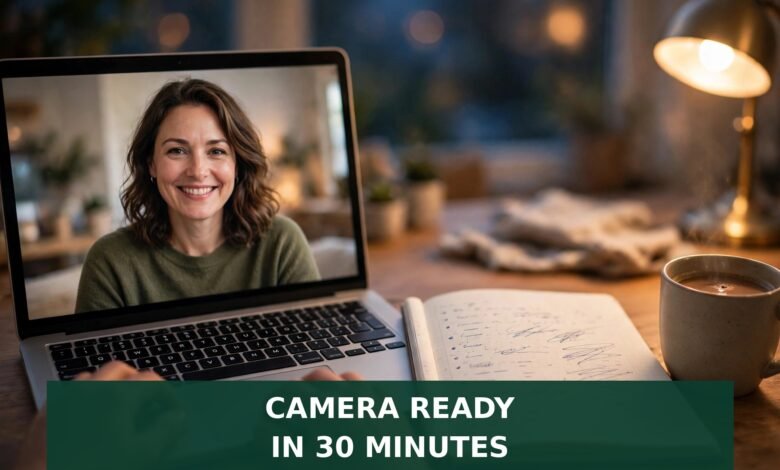
Your video interview is tomorrow at 10 a.m. You know the job, you have done the work, and you can answer the questions. So why does a laptop camera make your stomach drop in a way a meeting room never did?
Here is the honest reason: a video interview grades things a normal interview never asked you to think about — light, sound, framing, and a two-second delay. None of that is hard, and all of it is fixable in about half an hour once you know what to fix.
Quick answer
To prepare for a video interview, first find out whether it is live, pre-recorded, or AI-scored, because each one needs a different approach. Then put light in front of you, raise the camera to eye level, test your microphone and internet the day before, and practice three answers on camera. Dress fully, keep short notes beside the lens (never a script on screen), and have a calm recovery line ready in case the tech fails. Do that, and the camera stops being the test — your answers become the test again.
First, find out which kind of video interview you have
Most advice skips this step, and most video-interview failures start here. There are three formats, and they reward different behavior. One email to the recruiter settles it — ask whether the interview is live or pre-recorded, which platform they use, and how long you get per question. Recruiters expect that question, and asking it makes you look prepared, not nervous.
Live video interviews work like a normal conversation over Zoom, Teams, or Google Meet. Pauses, nods, and small talk all count, just as they would across a table.
One-way (pre-recorded) interviews give you a prompt and a short window — often 30 seconds to two minutes to think, then one to three minutes to record. There is no interviewer to react to, and retakes are sometimes allowed and sometimes not. Ask before you start: how long per answer, and can I re-record?
AI-scored interviews are the fast-growing third kind. Glassdoor’s 2026 guide, citing Greenhouse’s 2026 Candidate AI Interview Report, notes that 63% of job seekers have now been interviewed by an AI system, up 13 points in six months. A program may score your recording for content, clarity, or delivery. The fix is simple: speak in complete, structured sentences, answer the question actually asked, and do not rush. Machines and humans both struggle with a rushed, rambling answer.
The 30-minute camera-ready setup
Light goes in front of you. Sit facing a window, or put a lamp behind your laptop shining toward your face. Light behind you turns you into a silhouette. If you wear glasses, tilt the light slightly and check the preview for glare.
Camera at eye level. A laptop on a desk films you from below, which is nobody’s best angle. Stack books under it until the lens sits level with your eyes, and frame yourself from the chest up with a little space above your head.
Background boring on purpose. A plain wall or tidy room beats a distracting bookshelf. Check what the camera actually sees, move anything private out of frame, and close the door.
Sound beats picture. Interviewers forgive a soft picture; they do not forgive audio that cuts out. Use headphones with a microphone if you have them, record 30 seconds of yourself, and play it back for echo or fan noise. Close extra tabs and silence notifications before the call.
What to wear, and what the camera changes
Dress the way you would for the same job in person, head to toe. People do stand up on video calls — to grab a charger, to fix a cable — and the “suit on top, shorts below” joke stops being funny the moment it happens to you.
The camera changes two details. First, pick plain, solid colors over busy patterns — thin stripes shimmer on video and pull the eye from your face. Second, keep jewelry simple. Anything that taps a desk or jangles near a microphone sounds far louder than you expect.
The eye-contact trick that feels strange and works
Here is the part almost everyone gets wrong: looking at the interviewer’s face on screen looks, to them, like looking down. Real eye contact on video means looking at the camera lens, not at the face on screen.
That feels unnatural for about five minutes, then it becomes habit. Stick a small dot beside the lens and glance at it when you start each answer; between answers, look at the screen normally. Nobody expects a 30-minute stare. They notice when you look up at the start of an answer instead of down at your notes.
Keep a one-page outline beside the keyboard, not on the screen: three bullets per question you expect, plus the questions you want to ask. Reading from a screen is obvious on camera — your eyes move and your voice flattens. Glancing at paper beside the lens is invisible.
Practice on camera: the 3-answer drill
Do not rehearse 40 questions. Record yourself answering just three, then watch the playback. You will learn more in 15 minutes than in two hours of silent preparation. When you watch, check three things only: do you finish sentences or trail off, do you fidget, and do you sound like you are talking to a person or reading a document? Fix one thing per round. Perfection is not the goal. Sounding like a calm human is.
1. “Tell me about yourself.” Keep it under 90 seconds: where you are now, one result you are proud of, and why this role is the next step. Our guide to sample interview answers shows how to shape this without sounding scripted.
2. “Why this job?” Name one specific thing about the role or the company — a product, a team, a problem they solve — and connect it to work you have actually done.
3. “Tell me about a challenge.” Use the STAR shape: situation, task, action, result, in that order, and finish on the result. On video, a wandering story hurts twice, because the interviewer cannot use body language to steer you back.
When the tech fails: use the recovery script
Tech fails even for people who prepare. An aiapply guide on 2026 video interviews cites Owl Labs’ 2025 hybrid-work report, in which 77% of surveyed workers said they had lost time to technical difficulties. Interviewers know this. What they judge is how you handle it — so keep these lines ready and say them calmly instead of apologizing five times.
If the audio cuts out: “I am sorry, your sound just dropped for a moment. Could you repeat that last part?” If your own connection freezes: “My connection just froze. I am back now — could I pick up where I left off?” If the link will not open at all: email or message the recruiter right away, say the link is not working, and ask whether they can send a fresh one or switch platforms. Then stay by your phone.
Have a backup ready before the call: a charged phone with the meeting app and a hotspot you can switch to. That turns a disaster into a 60-second pause. And plug your laptop in — a low-battery warning at minute 25 of a 30-minute interview is a preventable way to lose the room.
The night-before and morning-of checklist
Tonight (30 minutes): confirm format, platform, and time zone. Test camera, microphone, and internet. Set up light, camera height, and background. Charge your devices, lay out your outfit, and write your one-page notes and questions.
Morning of (15 minutes): log in 10 minutes early and test again. Close every tab you do not need, put water in reach, and tell anyone you live with when your call ends. Take three slow breaths before you click join, so you do not start the first answer at double speed.
During the call: pause for a beat after each question. Video has a slight delay, and jumping in instantly leads to talking over each other. A one-second pause looks thoughtful, not slow. If your mind goes blank, say so plainly: “Let me think about that for a moment.” Interviewers respect that far more than a panicked ramble.
After the call: the same-day note
Within a few hours, send a short thank-you note: thank them for their time, mention one specific thing you discussed, and restate your interest in one sentence. Keep it to a few lines — the note is not a second interview. For the full timeline of when to nudge and what to say, see our telephone interview preparation guide, which covers voice-only skills that also help on video when the camera is off.
Frequently asked questions
How long should I prepare for a video interview?
About 30 minutes for setup plus one short practice round is enough for most roles. Spend the rest of your time on the job itself: the company’s recent work, the role’s real problems, and your own examples. A perfect background never saved a weak answer.
Should I look at the camera or the screen?
Look at the camera lens when you start an answer — that reads as eye contact to the interviewer. Look at the screen while they are speaking. Switching between the two is normal and looks natural.
Can I use notes in a video interview?
Yes, short notes beside the keyboard are fine and invisible on camera. A full script on screen is not: your eyes give it away and your voice flattens. Use bullets, not sentences.
What if my internet drops during a live interview?
Reconnect quickly, apologize once, and ask to pick up where you left off. If you cannot reconnect within a couple of minutes, message the recruiter and ask to reschedule or switch platforms. One calm recovery rarely costs anyone the job.
Are AI-scored video interviews different to prepare for?
The setup is the same, but delivery matters more: answer the exact question asked, use complete sentences, and structure answers with a clear beginning and end. Avoid filler and rambling, which are harder for a scoring system — and a human reviewer — to follow.
Final word
A video interview is still an interview. The camera adds a setup job, not a new personality test. Sort the format, fix the light and the lens, practice three answers on camera, and keep a recovery line in your pocket. Then forget the camera and talk about the work. If this round does not go your way, our guide on handling job rejection lays out a calm seven-day plan for the next one; if it goes well, our guide on declining an offer politely helps you keep every door open while you choose.
FREE Website: Turn Interview Skills Into Your Own Corner of the Internet
A video interview rewards people who can present themselves clearly. A website does the same thing for a business, around the clock. Today, every business needs a website — and setting one up is far simpler than most people think. You do not need to learn coding or hire a developer to start: buy hosting through our link below, tell the built-in AI about your business, and the AI builds the website for you.
 🌐
Free Website
🌐 FREE Website — Turn Your Ideas Into Income
Disclosure: This article contains an affiliate link. If you purchase hosting through it, we may earn a commission at no extra cost to you.
If you want to earn a handsome amount each month, a website plus steady, helpful articles is one of the most realistic paths there is: Google traffic can grow into monthly income over time. It takes consistent articles, not overnight magic, and nobody can honestly promise you a fixed amount. But a simple site that answers real questions is an asset that keeps working while you are busy with job applications.
Buy hosting through our link, send us your receipt through the JobyRoz contact page, and we will guide your basic business website setup for FREE. Disclosure: the hosting link above is an affiliate link, which means we may earn a commission if you buy through it, at no extra cost to you.
The Mock Interviewer Who Only Asks About Treats
Before your real interview, try a practice round in front of an audience that never judges a shaky first answer. This corgi watched a whole rehearsal without once interrupting, yawning, or checking the time — a better listener than most panels.
 🐶
Free Pet Guides
Want a practice audience that only asks about treats?
Two more tools for interview week: run your offer numbers through the money calculators at Earnrove, and keep a bottle of clean water on your desk for interview day with help from Clearove.
🧮Money Tools
Earnrove - Free Money Calculators






One Comment