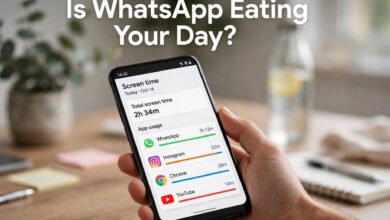
Let’s be honest with each other for a minute. Last night I checked my own screen time and WhatsApp was sitting at the top of the list — 2 hours and 40 minutes. I didn’t even realize I’d opened it that many times. If that sounds familiar, this guide is for you.
When people search for a “WhatsApp tracker” in 2026, they usually want one of three things: a clear picture of their own usage, a way to cut down on it, or — if they’re parents — a legitimate way to keep their minor child safe online. That’s exactly what this updated guide covers. What it does not cover is spying on someone else’s messages. Let’s get that out of the way up front: tracking another adult’s WhatsApp without their consent is illegal in most countries, violates WhatsApp’s Terms of Service, and can get the account doing it banned. No exceptions, no workarounds.
What a “WhatsApp Tracker” Actually Means in 2026
The honest definition is much simpler than the old ads made it sound. A usage tracker shows you your own activity: how many minutes you spent in the app, how many times you unlocked your phone to check a message, and which days are your heaviest. That’s genuinely useful data. Most of us drastically underestimate our time on messaging apps — seeing the real number is the first step toward changing it.
There’s a second legitimate category too: parental tools. Parents managing their own child’s device can see which apps are installed, set time limits, and get reports on usage. These tools don’t read end-to-end encrypted message content (no tool legitimately can), but they do give parents control over access and time spent. That’s what responsible parental monitoring looks like today.
Method 1: Android’s Built-in Digital Wellbeing (Free)
If your phone runs Android 10 or later, you already have the best free usage tracker installed — you just might not have opened it. Google’s Digital Wellbeing sits in Settings and breaks down your app usage by the minute.
Here’s how I use it to track my WhatsApp time:
- Open Settings → Digital Wellbeing & parental controls.
- Tap the screen-time chart to see your full app list.
- Tap WhatsApp in the list — you’ll see today’s total, yesterday’s, and your weekly trend.
That’s the tracking part, and it costs nothing. But the real power is the app timer. Tap the hourglass icon next to WhatsApp and set a daily limit — I use 60 minutes. When the time runs out, the app pauses and the icon goes grey. No drama, no willpower needed. You can also turn on Focus Mode to silence WhatsApp notifications during work hours, which honestly cuts my check-ins in half.
Sleep Mode is the underrated one: it turns your screen grayscale at your chosen bedtime. Doomscrolling through group chats in grey is a lot less addictive — take it from someone who’s tried.
Method 2: iPhone’s Screen Time (Free)
iPhone owners, you have the same thing with a different name. Open Settings → Screen Time and tap See All App & Website Activity. WhatsApp shows up under Social with your exact daily minutes, pickups, and notification counts.
What I like about Apple’s version: you can set a Downtime schedule (say 11 PM to 7 AM) when only essential apps work, and create App Limits just for the Social category so WhatsApp, Instagram, and TikTok share one budget. When you hit the limit, the apps grey out until you ask for more time. It’s a surprisingly effective nudge.
If you’re setting this up for a child, create a separate child Apple ID with Family Sharing and lock the Screen Time settings with a passcode only you know. That’s the foundation — more on parental tools below.
Method 3: Third-Party Usage Dashboards
Built-in tools are great for basics, but a few third-party apps go deeper. ActionDash (Android) is the one I recommend most often — it reads the same usage data as Digital Wellbeing but adds detailed history, unlock counts, and session lengths. It stores everything on your device, which is a real privacy advantage: your usage data never leaves your phone.
SocialX and similar screen-time blockers add an on-screen timer that floats while WhatsApp is open, turning amber and then red as you approach your daily goal. If you respond to visual cues, that’s a clever trick. My honest take after testing several of these: the built-in tools are enough for 8 out of 10 people. Pay for a third-party app only if you genuinely need the deeper history and reports.
One rule I never break when trying new usage apps: check the permissions before installing. A screen-time app needs usage access — that’s it. If it also asks for your contacts, call logs, or camera, walk away. And never sideload an “unlimited premium” APK from a random site; that’s how phones get infected.
For Parents: Monitoring Your Child’s WhatsApp the Right Way
This section is for parents of minor children, using a phone the parent owns or manages. And I’ll say this plainly because it matters: tell your child what you’re monitoring and why. Secret surveillance destroys trust faster than any app builds safety — every child-safety guide I read while researching this article said the same thing.
Start with the free built-in options:
- Google Family Link (Android): app approvals, screen-time limits, bedtime schedules, content filters, and location sharing — all free, no subscription. With 100 million+ installs and a 4.6 rating, it’s where most families should begin.
- Apple Screen Time (iPhone/iPad): app limits, downtime, communication limits for calls and messages, purchase controls.
Be realistic about their limits, because this is where parents get frustrated: no parental tool can read end-to-end encrypted message content. WhatsApp encrypts messages so that only the sender and receiver can read them — Family Link and Screen Time manage which apps are installed and how long they’re used, not the content of private chats. If a guide claims an app reads your child’s encrypted WhatsApp messages, it’s either lying or describing something that belongs nowhere near your phone.
What actually works best, according to every child-safety source I found: teach your child to use WhatsApp’s own safety tools — block and report contacts, disappearing messages, and privacy settings for profile photos and last-seen status. A kid who knows how to block a stranger is better protected than one with the strictest dashboard.
Red Flags: “Trackers” to Avoid
The old version of this post mentioned apps that tracked contacts’ online status and profile-picture changes. Here’s my 2026 verdict on that whole category: avoid them. They operate in a grey zone at best — WhatsApp’s terms prohibit unauthorized data collection, accounts using these tools can be suspended, and the “features” (watching when someone was last online) exist almost exclusively for stalking and harassment. There’s no legitimate productivity use case that requires monitoring someone else’s online status.
Other red flags: apps that promise to show you someone else’s messages, “spy” tools that require you to install something on another person’s phone, and anything that asks for your WhatsApp verification code. Hand your code to a stranger’s app and you’ve handed them your account.
The Bottom Line
Tracking WhatsApp usage in 2026 isn’t about watching other people — it’s about understanding your own habits and, for parents, guiding your kids. Your phone already has the tools built in: Digital Wellbeing on Android, Screen Time on iPhone. Set one app timer this week. Check the number next Sunday. I’d bet the real figure surprises you — it surprised me, and I’m the one writing the guide.
Frequently Asked Questions
Can I track how much time I spend on WhatsApp for free?
Yes. Android’s Digital Wellbeing (Settings → Digital Wellbeing & parental controls) and iPhone’s Screen Time (Settings → Screen Time) both show your exact daily and weekly WhatsApp usage for free, with no extra app needed.
Is there a legitimate app to monitor my child’s WhatsApp?
Google Family Link and Apple Screen Time are the safest starting points — they’re free, from the platform owners, and manage app access and screen time. No legitimate tool can read end-to-end encrypted WhatsApp message content, so be skeptical of any app that claims it can.
Is it legal to track someone else’s WhatsApp without their knowledge?
In most countries, no. Monitoring another adult’s messages without consent can violate wiretapping and privacy laws, and WhatsApp’s Terms of Service prohibit unauthorized data collection — violations can lead to account bans.
Can “WhatsApp tracker” apps really show me who viewed my profile?
No. WhatsApp does not expose profile-view data to anyone, including third-party apps. Any app claiming this feature is misrepresenting what it can do.
What’s the safest way to reduce my WhatsApp usage?
Set a daily app timer (Digital Wellbeing on Android, App Limits on iPhone), turn on Focus Mode during work hours, and mute non-essential group chats. Small limits beat big intentions — start with one hour a day and adjust.
 🌐
🌐Free Website
🌐 FREE Website — Turn Your Ideas Into Income
Want a handsome monthly income? Publish helpful articles consistently and let Google traffic grow into real earnings — steady work, never overnight magic. We never guarantee earnings.
Disclosure: This article contains an affiliate link. If you purchase hosting through it, we may earn a commission at no extra cost to you.
 🐶
🐶Free Pet Guides
🦴 Four-Legged Family Members Welcome
🧮Money Tools
🧮 Earnrove — Free Money Calculators