Disclosure: This page contains a referral link. If you buy through it, we may earn a small commission at no extra cost to you, and you get an extra discount. We only recommend tools we use ourselves — JobyRoz runs on Hostinger.
The letters "VPS" scare a lot of beginners, and honestly, I understand why. It sounds like something needing a computer science degree and a black terminal full of cryptic commands. But here is the truth nobody tells you: a VPS is just the next step up from shared hosting — the same internet, with more room to breathe.
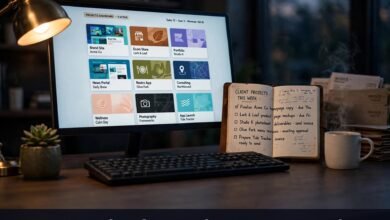
A managed VPS feels almost exactly like the dashboard you already use.
Quick answer: the best cheap VPS for beginners
The best cheap VPS hosting for beginners is a managed VPS at an entry-level price. "Managed" means the hosting company handles server setup, security patches, and updates — you run your website through a familiar dashboard. Unmanaged VPS looks cheaper on paper, but it makes YOU the system administrator, which is a second job you never signed up for.
In 2026 comparisons, Hostinger's VPS keeps landing on "Overall Value" and "Best for Beginners" lists — NVMe storage, root access, 99.9% uptime — running through the same hPanel dashboard as shared hosting. If you want managed and beginner-friendly, check Hostinger's VPS plans through our referral link — extra discount for you, and a 30-day money-back guarantee on every plan.
What a VPS actually is (no tech degree needed)
Think about renting a place to live. Shared hosting is like renting a room in a shared house. You have roommates, and everyone shares the kitchen, the bathroom, the Wi-Fi. If your roommate streams movies all night, your internet crawls — and there is nothing you can do about it.
A VPS is moving into your own small apartment. Your own kitchen, your own bathroom, a front door that locks. The building still stands around you, but your space is guaranteed: no roommate can use up all the hot water. Your website gets its own reserved slice of CPU, RAM, and storage — nobody else's traffic spike can slow you down.
The other options? Dedicated hosting is buying the whole building — total control, big price tag, overkill for a beginner. Cloud hosting is a smart building that adds rooms whenever guests arrive — flexible, but priced for serious traffic. For most beginners, the small apartment — the VPS — is the sweet spot.
Managed vs unmanaged VPS: the one decision that actually matters
Most guides bury the lede. The real question is not which brand to buy — it is whether you want to manage the server yourself or have the host do it for you.
Unmanaged VPS has the cheaper sticker price — but YOU become the sysadmin: installing the OS, configuring the web server, applying security patches, fixing things at 2 a.m. Great if your goal is to *learn* server management (2026 guides point learners toward DigitalOcean, value hunters toward Hetzner, simplicity seekers toward Lightsail). Terrible if you just want your business website to stay online.
Managed VPS costs a little more, and the host handles setup, security, updates, and backups. You get a control panel and a support team that actually answers.
The 2026 catch: many "managed VPS" pages are really a cheap unmanaged server with a separate management subscription glued on top — a fee that can double or triple the bill at checkout, a pattern an October 2026 hosting guide flagged. Truly beginner-friendly means management included in the advertised price, not sold as an add-on.
My honest take: unless learning server administration is the goal, buy managed. Your website is a business tool, not a homework assignment.
| Managed VPS | Unmanaged VPS | |
| Who runs the server | The hosting company | You |
| Setup & security patches | Done for you | Done by you |
| Control panel | Included, beginner-friendly | Often just a terminal |
| Support | 24/7 help included | Usually minimal |
| Cost | A bit more per month | Cheapest sticker price |
| Best for | Beginners, business owners | Developers and learners |
6 signs you are ready for a VPS
If two or three of these are true for you, you are not "too early" — you are right on time.
1. Your site slowed down and optimization stopped helping.
Compressed images, caching plugin — still sluggish. When optimization stops moving the needle, the bottleneck is the server.
2. You keep hitting resource limits.
CPU and memory warnings, the occasional "503 Service Unavailable." Every week is your host's polite way of saying the plan is too small.
3. You want to run software your shared plan blocks.
Custom apps, staging environments, specific server tools — shared hosting says no to most of this. A VPS says yes.
4. You run a store and checkout speed is costing you sales.
A slow checkout means abandoned carts, and you will never know how much money walked away.
5. Your traffic keeps growing.
A VPS buys you headroom — far nicer than an emergency migration during your busiest week.
6. You are tired of bad-neighbor problems.
On shared hosting, one careless site on your server can hog resources or get the shared IP flagged. A VPS puts a locked door between you and everyone else.
What to look for in a beginner-friendly VPS (checklist)
Not every cheap VPS is beginner-friendly. Run every plan through this list:
- Real management included in the price — not a bolt-on subscription that doubles the bill at checkout.
- A control panel you already understand — Hostinger's VPS uses the same hPanel dashboard as its shared hosting, so there is nothing new to learn.
- Free website migration — moving your site should be the host's job, and Hostinger's team does this daily.
- Automatic backups — beginners make mistakes. One-click restore turns a disaster into a five-minute fix.
- 24/7 real support — when something looks wrong at midnight, you want a human being, not a forum thread from 2019.
- NVMe storage and guaranteed resources — fast storage plus CPU and RAM that are actually yours. That is the whole point of a VPS.
- A real money-back guarantee — Hostinger gives 30 days on every plan: try it, test the speed, and get a refund if it is not for you.
Ticking most of these boxes? Check Hostinger's VPS plans with our referral discount here — the extra discount applies automatically at checkout.
How to start your first VPS without fear (step by step)
Deep breath. None of this requires a terminal:
1. Pick the managed entry-level plan.
Start small — scale up later without migrating.
2. Choose a server location near your visitors. Closer server, faster loading.
3. Use the free migration.
Let Hostinger's team move your existing site — included, done daily, minimal or zero downtime.
4. Install WordPress with one click
from the control panel. No command line, no configuration files.
5. Point your domain to the new server
by updating nameservers. DNS takes a few hours — this step is mostly waiting.
6. Test everything before you announce anything.
Homepage, contact forms, checkout, logins. Click through it all like a visitor would.
Total hands-on time: about an afternoon — that 24/7 support team is exactly what the managed price pays for. Ready? Start your first VPS here with our referral link — the 30-day money-back guarantee means you can validate everything yourself, risk-free.
What a cheap VPS costs in 2026
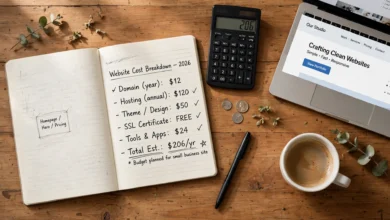
Entry-level VPS plans in 2026 generally cost a few dollars a month — the price of two coffees, not a car payment. Managed plans cost a bit more, because you are paying for someone else to be the sysadmin. As a snapshot, Hostinger's entry-level KVM 1 plan is listed at $5.19/month intro through our referral link right now (verified today on hostinger.com; it renews at $11.99/month).
Two honest warnings. First, prices and promotions rotate constantly — always check the live pricing page before you decide, and treat any printed price, including the snapshot above, as exactly that: a snapshot. Second, watch the "managed" upsell trick: if a management fee appears as a separate line item at checkout, the real price is higher than the headline.
Want today's actual numbers? Check Hostinger's current VPS pricing with our referral discount — the discount applies automatically, and the 30-day guarantee covers you either way.
Frequently asked questions
Is a VPS harder to use than shared hosting?
On an unmanaged VPS, yes — noticeably. On a managed VPS like Hostinger's, it feels nearly identical: the same hPanel dashboard, one-click installs, and a support team on call. The "server" part stays invisible.
Do I need to know Linux or use the command line?
Not with a managed VPS. You get root access if you want to tinker, but day to day you will never touch a terminal. Everything happens in the control panel.
Can I upgrade my VPS later if my site keeps growing?
Yes — adding CPU, RAM, or storage is usually just a plan change: no migration, no rebuilding. You grow into the server instead of outgrowing it.
Is Hostinger's VPS really managed?
Hostinger's VPS plans run on the same hPanel dashboard as shared hosting and include free website migration. Still, "managed" varies a little by plan — confirm on the live plan page what yours covers.
What if I buy a VPS and regret it?
Every Hostinger plan carries a 30-day money-back guarantee. Migrate your site, test the speed, put it through a busy week — if it is not for you, you get your money back. That is what makes trying a VPS low-risk.
Conclusion
A VPS is not a mountain to climb. It is your own small apartment after years of sharing a house — your space, your speed, your locked door. The fear comes from the word, not the reality: with a managed plan, you spend your time in a familiar dashboard, not a terminal window.
 🌐
🌐Free Website
🌐 FREE Website — Turn Your Ideas Into Income
Want a handsome monthly income? Publish helpful articles consistently and let Google traffic grow into real earnings — steady work, never overnight magic. We never guarantee earnings.
Disclosure: This article contains an affiliate link. If you purchase hosting through it, we may earn a commission at no extra cost to you.
Need help with your basic setup after buying? Buy hosting through our link, send us your receipt through the JobyRoz contact page, and we will guide your basic business website setup for FREE.
 🐶
🐶Free Pet Guides
🐾 Got a Dog at Home?
🧮Money Tools
🧮 Earnrove — Free Money Calculators