How to Save Money on Subscriptions in 2026: The 30-Minute Audit That Finds Cash You Forgot About

Last spring, a friend of mine opened her banking app and stared at a $14.99 charge from a meditation app she had downloaded in January, used twice, and never opened again. She had paid for it for four months without noticing. When she finally listed everything, the total topped $90 a month — and she could only name about half of it from memory.
That gap is the whole problem with subscriptions: small, automatic, easy to forget. The fix is not a spending freeze or canceling everything you enjoy. It is a simple half-hour review, done properly, once — then repeated every few months.
Quick Answer: How Do I Save Money on Subscriptions?
Pull 12 months of statements, list every recurring charge, and sort each into Keep, Pause, or Cancel. Treat anything untouched in 90 days as a first suspect, pause the maybes for 7 days, and cancel the rest. Then rotate streaming one at a time, switch keepers to cheaper tiers or official family plans, and set reminders for renewals and trials. Most people find at least one forgotten charge — that alone pays for the half hour.
How Do I Find All My Subscriptions?
Do not trust your memory here. Open your bank app and card statements and search for recurring charges, going back a full 12 months, not just last month. This is the step most guides skip and the one that matters most: annual charges hide in quiet months. A March antivirus renewal, a July domain renewal, a magazine billing every November — none appear in a single month’s statement, but all are real money leaving your account.
Check a few places people forget: your phone’s subscription settings, PayPal’s automatic payments page, Amazon’s memberships section, and your email inbox for the words “receipt” and “renewal” — old welcome emails are a good record of forgotten signups. Write every charge down in one place, notebook or spreadsheet. The tool does not matter; seeing the full list in one place is what changes things.
What Is the 30-Minute Subscription Audit?
Set a timer and work in three passes. First, ten minutes: write down every subscription, its monthly cost, and its renewal date. Second, fifteen minutes: mark each Keep, Pause, or Cancel using the rules below. Third, five minutes: act on the easy cancels right away. The cancels you postpone to “later” survive another billing cycle.
Do not research alternatives during the audit — that is how a 30-minute job turns into a lost afternoon. Your only job is to decide what stays, what goes, and what gets a second look. Hunt for cheaper tiers afterward, for the keepers only.
How Do I Decide What to Keep, Pause, or Cancel?
Use three buckets with plain rules, so you are not making an emotional decision about every single service.
Keep: you used it in the last 30 days and would genuinely miss it this week — your daily music app, the cloud storage holding your photos, the one streaming service your household watches. These stay without guilt.
Pause: you have not used it in the last 90 days but are not ready to let it go. Many services let you pause for 30 to 90 days without losing your profile or history. You stop paying, and if you never think about it again during the pause, you have your answer.
Cancel: you cannot remember the last time you used it, you signed up for a free trial and never meant to keep it, or you have a duplicate doing the same job. Two music services, three streaming platforms with the same shows, a fitness app you replaced with free videos months ago — pick the best one and cancel the rest. If a service makes canceling hard, that is useful information in itself: a company confident in its product does not need to hide the cancel button.
For borderline cases, try the 7-day test: cancel and notice whether you reach for it. If a week passes without a single “I wish I still had that,” you did not need it. If you missed it, resubscribing takes two minutes.
How Much Does a Typical Subscription Stack Actually Cost?
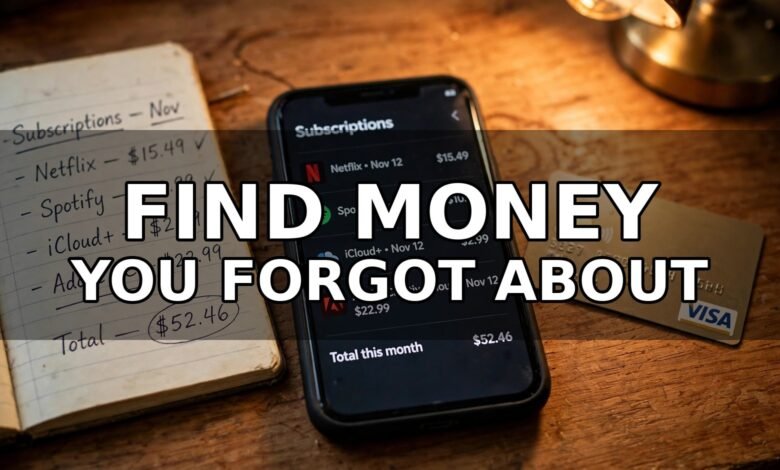
Here is a worked example — an illustration, not a promise about your own spending. Take a common stack: video streaming at $15.49 a month, music at $10.99, cloud storage at $2.99, and a design app at $22.99 — $52.46 a month, about $629 a year.
Now suppose the audit finds the design app unopened for five months. Canceling it removes $22.99 a month, about $276 over a year. Add a cheaper tier on the music service and one $60 annual charge found in the 12-month trawl, and this example frees up several hundred dollars a year — while still keeping the two services used every day.
Your numbers will differ, and that is fine. The math that matters is yours: your monthly total times twelve is the real price of your stack.
Surveys back up the size of the gap: C+R Research found people estimated about $86 a month while actually paying around $219; West Monroe put average household spending at $273 a month; and Bank of America Institute analysis found subscription spending rose 7.7% year over year in July 2026. These are survey averages, not a prediction about you — but they explain the shock of a first full tally.
How Does Streaming Rotation Work?
Rotation is the simplest way to keep watching everything you like while paying for only part of it. Instead of four streaming services at once, keep one at a time: watch what you want, cancel, move to the next one, and come back for a month when a new season drops.
This works because most of us watch one service heavily at a time anyway, and your profile and watchlist are usually still there when you return. Set a reminder for the day before each rotation month ends so you actually switch instead of drifting back into paying for all of them. Families can rotate too: one month the kids’ pick, the next the adults’.
One warning: do not rotate the service your household uses daily. Rotation is for services you dip into occasionally, not the one that is on every evening.
How Can I Pay Less Without Canceling Everything?
Before you cancel a keeper, check whether a cheaper way to keep it exists. Most big services have tiers, and the premium tier is rarely the one you need.
Try the ad-supported tier. On several platforms it costs roughly half the ad-free price, and if you watch a few times a week, a couple of short ad breaks are a reasonable trade. Try one evening on it before deciding.
Check student and military discounts. Music and shopping services in particular offer real reductions, sometimes around half price. If anyone in your household qualifies, check before paying full price again — and calendar the yearly verification step.
Use official family and household plans. Many services sell a tier covering several people for less than separate subscriptions. Only use plans as the service allows — sharing a login outside the plan’s rules can get the account restricted. If your household genuinely shares it, that plan is usually the cheapest honest route.
Consider annual billing for true keepers only — some services charge roughly two months less per year. Only do this for a service you have kept through a full audit cycle; paying a year upfront for something you might cancel in March is not a saving.
What Do I Say When I Call to Cancel?
You do not need a confrontation or a long story. A short, polite script works better. Try this:
“Hi, I’d like to cancel my subscription, please. I’ve reviewed my budget and I’m cutting back on services I’m not using enough. Is there anything you can do on the price or a lower tier before I go ahead?”
That last sentence is the whole negotiation: retention teams can often offer a loyalty discount, a few months at a lower rate, or an unadvertised cheaper tier. If the offer is good and you want the service, take it — but set a reminder for the day it ends, because the price usually jumps back without warning. If not, say thanks and finish the cancel. You owe no reason beyond “it does not fit my budget right now.”
Two practical notes: get a confirmation email or screenshot before you hang up — an unproven “canceled” is a charge waiting to happen. And if a service only lets you cancel by phone in business hours, block ten minutes, make the call, and treat the friction as confirmation you chose well.
How Do I Stop Free Trials and Annual Charges From Sneaking Back?
The audit fixes today; a calendar habit keeps it fixed. For every keeper, add two reminders: one a few days before each annual renewal, and one for every free trial you start. The trial rule is simple: the moment you sign up, set a reminder for two days before it ends, then decide calmly whether the service earned your money. Trials are designed around forgetting — your reminder removes their advantage.
Once a quarter, spend ten minutes re-running the quick audit: glance at three months of statements for anything new. Subscriptions creep back through bundles, app purchases, and “free for three months” offers — a quarterly glance catches them while small.
One more trap: the bundle. A phone or internet plan that “includes” a streaming service is only a deal if you would pay for that service anyway. If the bundle costs more than your current plan, you are buying a subscription with extra steps.
Where Should the Freed Money Go?
This part turns a one-time cleanup into something lasting: if the freed money just melts into everyday spending, the audit feels pointless within a month. Give it a destination before you finish.
The simplest destination is a sinking fund — money set aside monthly for big, predictable bills like car repairs or holiday costs. Our guide to sinking funds for beginners walks through a setup that takes minutes. If you like structure, the 52-week money saving challenge turns small weekly amounts into a habit. A no-spend month can reset your spending instincts after the audit, and if your income varies, the guide to budgeting on irregular income shows how to handle lean months without raiding the fund. If you share costs with a partner, splitting bills fairly keeps the freed money from becoming a new argument.
None of this is about getting rich from canceling a music app. It is about making sure the money you earn goes to things you chose, instead of leaking to services you forgot existed.
Frequently Asked Questions
How often should I audit my subscriptions?
A full 30-minute audit every three to four months works well for most people, with a quick glance at your statements each month. Annual charges and new signups creep in between audits, so the quarterly rhythm catches them before they add up.
What is the easiest way to find forgotten subscriptions?
Search 12 months of bank and card statements for recurring charges, then check your phone’s subscription settings, PayPal automatic payments, and your email for renewal receipts. The 12-month lookback matters most, because annual charges hide in months you would otherwise skip.
Is it better to pause or cancel a subscription?
Pause when you are unsure and the service offers it — you stop paying but keep your profile and history, and a quiet pause tells you whether you miss it. Cancel when you have not used it in months, when it duplicates another service, or when you signed up for a trial you never meant to keep.
Can I share streaming accounts with family to save money?
Yes, but only through the official family or household plans the service offers, used the way its terms allow. Sharing a single login outside those plans can get the account restricted. Family plans are usually the cheapest honest option when a household genuinely shares a service.
Do subscription audit apps save money?
They can help you see everything in one place, but they are not necessary — a notebook or spreadsheet does the same job for free. Be careful about handing an app access to your bank account, and remember that adding a paid tracker app to manage your subscriptions can quietly become subscription number thirteen.
Conclusion
Subscriptions are not the enemy; the ones you love are worth every cent. The problem is the forgotten ones, the duplicates, and trials that quietly turned into bills. A 30-minute audit with a full year of statements and three honest buckets finds those charges. Do it this week, set the quarterly reminder, and give the freed money a job before it drifts away.
FREE Website: Turn Your Money Know-How Into Your Own Site
 🌐
🌐Free Website
🌐 FREE Website — Turn Your Ideas Into Income
Want a handsome monthly income? Publish helpful articles consistently and let Google traffic grow into real earnings — steady work, never overnight magic. We never guarantee earnings.
Disclosure: This article contains an affiliate link. If you purchase hosting through it, we may earn a commission at no extra cost to you.
And if you want to earn a handsome amount monthly, make a website and start writing helpful articles on it. Google traffic can turn into monthly income over time, but it takes consistent articles — not overnight magic, and nobody can promise you a particular amount. A subscription audit like this one is exactly the kind of useful, honest article readers search for, and a small site built around practical money guides can grow steadily from there.
Buy hosting through our link, send us your receipt via the JobyRoz contact page, and we will guide your basic business website setup for FREE. Disclosure: the link above is an affiliate link, so we may earn a commission if you buy through it, at no extra cost to you.

The Subscription You Will Never Cancel
After a ruthless audit, one monthly cost survives every round of cuts without a second thought: the dog. No pause button, no cheaper tier, no cancellation script — just a golden retriever asleep by your phone, completely unbothered by your budget spreadsheet. Some subscriptions earn their place by being useful. This one earns it by being there, every single day, tail first.
 🐶
🐶Free Pet Guides
Could your best subscription be the one with four paws?
Running the numbers on your own budget? Try a money calculator over at Earnrove — and if clean water matters to your household too, the practical guides at Clearove are worth a look.
🧮Money Tools
🧮 Earnrove — Free Money Calculators